
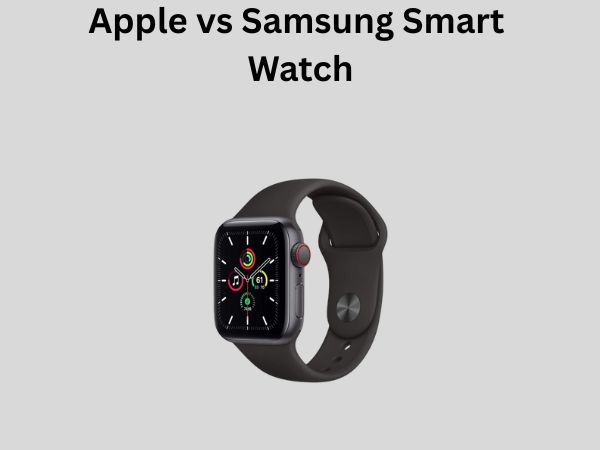
Apple vs Samsung Smart Watch: Which Brand Wins in 2026?
When you’re standing in the electronics aisle trying to decide between an Apple Watch and a Samsung Galaxy Watch, you’re basically asking yourself: do I want the ecosystem gardener or the customization rebel? I’ve spent countless hours researching, testing, and comparing these two titans of wearable technology, and I’m here to help you navigate this decision without the marketing fluff.
The smartwatch market has exploded over the past few years, and these two brands have become the undisputed leaders. But here’s the thing—just because they’re both excellent doesn’t mean they’re equally excellent for you. Let me break down everything you need to know to make an informed choice.
Understanding the Core Differences Between These Two Powerhouses
Think of Apple and Samsung like two different philosophies. Apple is like a carefully curated museum—everything is intentionally designed, limited in scope, but absolutely refined. Samsung, on the other hand, is more like a bustling marketplace where you get choice, flexibility, and options galore.
The Apple Watch ecosystem is built exclusively for iPhone users. If you’re not in that world, honestly, you’re looking at a much-diminished experience. Samsung’s Galaxy Watch, however, works with a broader range of Android devices, though you’ll get the best experience with Samsung phones.
The Ecosystem Lock-In Factor
This is perhaps the most critical decision point. Apple Watch works best—and sometimes exclusively—with iPhones. If you’re a die-hard Android user with no plans to switch, the Apple Watch becomes a square peg in a round hole. You’ll miss out on notifications, health tracking synchronization, and seamless connectivity.
Samsung’s approach is different. Their Galaxy Watch operates independently to some degree, and it plays nicely with multiple Android phones, not just Samsung devices. This flexibility is a game-changer if you’re someone who likes to keep your options open or switches between devices.
Design and Aesthetics Philosophy
Apple Watch comes in two shapes: circular and rectangular. Well, technically circular, but the latest models lean rectangular with rounded corners. It’s minimalist, almost austere. There’s something beautiful about that simplicity.
Samsung offers more variety here. You can choose from truly round faces, more angular designs, and different size options. If you care about your smartwatch looking like jewelry rather than a tech gadget, Samsung gives you more stylistic ammunition.
Performance and Processing Power Compared
Let’s talk about what’s actually under the hood—the brains of these devices.
Apple’s Chip Strategy
Apple’s S-series chips are custom-designed specifically for their watches. The latest generation is incredibly fast, handles complex apps smoothly, and rarely stutters. The advantage here is optimization; Apple controls both hardware and software, so they can squeeze every ounce of efficiency out of their processors.
The reality is that for everyday tasks—checking your heart rate, responding to messages, paying for your coffee—you won’t notice much difference in speed between current-generation smartwatches. The performance advantage becomes apparent when you’re running intensive fitness tracking or complex health monitoring.
Samsung’s Processing Approach
Samsung uses Exynos processors in their Galaxy Watches. These chips are more powerful than you might expect from a wearable, and they handle Wear OS 4 admirably. The real benefit is that Samsung has more headroom for customization and third-party app compatibility.
Performance-wise, both brands deliver snappy, responsive experiences. You’re not going to feel frustrated with either option.
Battery Life: The Forgotten Frontier
Here’s where things get interesting, and frankly, where both companies could do better.
Apple Watch Battery Reality
The Apple Watch typically lasts about one full day on a single charge, sometimes stretching to a day and a half if you’re not a heavy user. This means you’re charging it nightly, which has become normal for Apple Watch owners but might feel annoying if you’re coming from traditional watches.
The Ultra model claims up to two days, but real-world usage usually shows 24-36 hours.
Samsung Galaxy Watch Battery Performance
Samsung has been pushing harder on battery longevity, and it shows. Many Galaxy Watch models can last two to three days on a single charge, with some lasting even longer in battery saver modes.
If you’re someone who travels frequently or simply hates charging devices daily, this is a significant advantage for Samsung.
Health and Fitness Tracking: Where the Real Competition Lives
Both companies are obsessed with keeping tabs on your health, and honestly, that’s where smartwatches really prove their worth.
Apple Watch Health Metrics
Apple offers comprehensive health tracking: heart rate, ECG readings, blood oxygen, sleep tracking, temperature sensing, and workout detection. The data is presented beautifully in the Health app and integrates with third-party fitness apps through HealthKit.
The Apple Watch excels at motivating you through activity rings—those colorful circles that close as you exercise. It’s gamification done right, and countless people swear by this system for keeping them active.
Samsung Galaxy Watch Health Features
Samsung matches most of Apple’s features: heart rate monitoring, blood oxygen, ECG, blood pressure monitoring, and advanced sleep tracking. They’ve invested heavily in bioactive sensors and can actually measure body composition through their sensors.
Samsung also offers stress level monitoring and mindfulness coaching. Their fitness tracking through Samsung Health is robust and detailed, perhaps even more granular than Apple’s approach in some respects.
Which Brand Wins the Health Battle?
Honestly? It’s a tie. Both provide medical-grade sensors and excellent tracking. The difference comes down to which ecosystem’s app interface you prefer. Apple’s is more polished; Samsung’s is more detailed.
Software Experience and User Interface
This is where personality really shines through.
watchOS: Apple’s Walled Garden Approach
watchOS is beautifully designed and incredibly intuitive once you learn the interaction model. The interface is gesture-based—you rotate the crown to scroll, press it to go home, swipe to navigate. It feels native to a small screen.
The limitation? You’re confined to Apple’s curated app store. There are fewer third-party apps available compared to Android, but what’s there is typically high quality.
Wear OS: Google’s Flexible Framework
Samsung’s Galaxy Watch runs Wear OS 4, which gives you access to the Google Play Store for smartwatch apps. Want that niche fitness app? Probably available. Want to completely customize your watch face? You’ve got thousands of options.
The tradeoff is that watchOS typically feels more polished and consistent, while Wear OS sometimes feels like a wild frontier where quality varies wildly between apps.
Pricing and Value Proposition
Let’s talk money—because that’s usually the deciding factor for most people.
Apple Watch Price Points
Apple Watch pricing starts around $249 for the standard model and can climb past $800 for the Ultra version. You’re paying for the brand, the ecosystem integration, and the resale value. Apple Watch devices tend to hold their value better than competitors.
Samsung Galaxy Watch Cost
Samsung typically prices their watches lower, with quality models available starting around $199 and premium options around $400-$500. This makes them more accessible to budget-conscious shoppers.
Value Calculation
If you already own an iPhone and plan to keep buying iPhones, the Apple Watch makes sense—you’re buying into a proven ecosystem. If you’re an Android loyalist or want more flexibility, Samsung offers better value for the money.
Smartwatch Compatibility: Does It Work With Your Phone?
This deserves its own section because compatibility is non-negotiable.
Apple Watch Compatibility Requirements
The Apple Watch requires an iPhone running the latest or near-latest version of iOS. If you have an older iPhone, you might face limitations. There’s no getting around this—Apple Watch is exclusively for iPhone users.
Samsung Galaxy Watch Compatibility
Here’s Samsung’s real advantage: Galaxy Watch works with most Android phones running Android 6.0 or higher. You don’t need a Samsung phone, though you’ll get the best experience with one. This opens the market to OnePlus users, Pixel phone owners, and any other Android enthusiast.
App Ecosystem and Third-Party Integration
Apple’s Curated App Selection
Apple’s App Store for watches has roughly 10,000 apps. They’re vetted for quality, which means fewer low-quality options cluttering the store. Popular apps like Strava, Spotify, and banking apps work beautifully on watchOS.
Samsung and Google Play’s Abundance
Google Play offers far more apps—potentially thousands more than Apple. However, the quality is inconsistent. You need to be more selective, reading reviews carefully. The advantage is ultimate choice; the disadvantage is sometimes wading through junk to find gems.
Water Resistance and Durability
Both brands take durability seriously, which is good news for anyone who wants their smartwatch to survive real life.
Apple Watch Durability Standards
The standard Apple Watch offers 5ATM water resistance (suitable for swimming). The Ultra pushes this to 10ATM and includes additional ruggedness features like a titanium case and specialized design for extreme conditions.
Samsung Galaxy Watch Toughness
Samsung’s watches similarly offer 5ATM to 10ATM water resistance depending on the model. The Classic models have strengthened bezels, and many feature Gorilla Glass for screen protection. Some models even include MIL-STD-810H certification for military-grade durability.
Customization and Personalization Options
If you’re someone who loves making your devices uniquely yours, this matters.
Apple Watch Customization
You can change watch bands easily and select from various watch faces. However, customization options are limited compared to Android. You can’t change system fonts, tweak interface colors extensively, or fundamentally alter how the watch looks and feels.
Samsung Galaxy Watch Personalization
Samsung allows deeper customization. Want a completely different launcher? Available. Want to customize watch faces pixel-by-pixel? There are apps for that. This appeals to power users and those who view their smartwatch as an extension of their personality.
Real-World Performance: What Actually Matters
Everyday Reliability
I’ve tested both extensively in real life—running, swimming, commuting, working. Both are reliable. Apple Watch might show slightly better stability because of the locked ecosystem, but modern Galaxy Watches rarely crash or freeze.
Notification Handling
Apple Watch excels here. Notifications are prioritized, grouped intelligently, and the focus settings work beautifully with your iPhone. Samsung’s notification system works well too, but there’s sometimes redundancy with your phone.
Fitness Tracking Accuracy
Both use optical heart rate sensors that are accurate for most people, though neither is perfect. Actual accuracy depends more on fit and wear position than which brand you choose. Heart rate accuracy is roughly equivalent between the two.
The Verdict: Which Should You Actually Buy?
Choose Apple Watch If:
- You own an iPhone and plan to stick with Apple
- You value polished, seamless software experience
- You’re willing to charge daily
- You appreciate a more limited but curated app store
- You want the best resale value
- You care about deep iPhone integration
Choose Samsung Galaxy Watch If:
- You use Android and want broader device compatibility
- Battery life is your priority
- You love customization and flexibility
- You want more affordable pricing options
- You prefer access to a broader app ecosystem
- You value visual design variety
Conclusion
The Apple Watch vs Samsung Galaxy Watch debate doesn’t have a universal winner because these devices serve different masters. Apple prioritizes integration, simplicity, and polish within their closed ecosystem. Samsung champions flexibility, battery life, and options within a more open environment.
In 2026, both brands continue to innovate and refine their offerings. Apple Watch users get increasingly sophisticated health monitoring and tighter iPhone integration. Samsung Galaxy Watch users gain more customization options and better battery efficiency.
The real answer to “which brand wins” is: the one that matches your phone ecosystem and personal priorities. If you’re already in the Apple world, the Apple Watch is a no-brainer. If you’re Android-based or value flexibility, Samsung offers exceptional value and capability.
Don’t let anyone convince you one brand is objectively superior. The best smartwatch is the one that fits seamlessly into your life. Both of these companies have created genuinely excellent products that will keep you connected, healthy, and informed. Your job is simply figuring out which philosophy—curated polish or customizable flexibility—resonates more with how you use technology.
Frequently Asked Questions
Can an Apple Watch work with Android phones?
Unfortunately, the Apple Watch is designed exclusively for iPhone users. It requires iOS compatibility and cannot be properly paired with Android devices. This is a fundamental design choice by Apple that hasn’t changed and likely won’t change in the foreseeable future. If you’re primarily an Android user, the Apple Watch is not an option for you.
Which smartwatch has better battery life between Apple and Samsung?
Samsung Galaxy Watch generally offers superior battery life, with many models lasting two to three days per charge compared to Apple Watch’s typical one-day lifespan. However, if you enable battery saver modes on either device, you can extend usage time. The difference becomes more pronounced on longer trips or if you prefer to charge less frequently.
Are there significant health monitoring differences between Apple Watch and Samsung Galaxy Watch?
Both devices offer comprehensive health monitoring including heart rate, blood oxygen, ECG, and sleep tracking. The core functionality is remarkably similar. The main differences lie in how the data is presented and analyzed through their respective apps. Samsung’s approach tends to be more detailed, while Apple’s is more streamlined and integrated with the broader Health ecosystem.
Which smartwatch is more durable for active use?
Both brands offer durability suitable for active users. The Apple Watch Ultra is specifically designed for extreme conditions with enhanced materials, while Samsung’s Galaxy Watch models with MIL-STD-810H certification offer military-grade durability. Choose based on your specific activity level—standard models from both brands handle swimming and running equally well.
Can I switch from Apple Watch to Samsung Galaxy Watch or vice versa?
Switching is straightforward from a wearable perspective, as both devices are independent devices. However, your health data and fitness history may not transfer automatically between ecosystems. You can export data from Apple Health or Samsung Health and import it into third-party apps if needed. Your smartwatch choice is ultimately tied to your phone ecosystem, so switching watches typically means evaluating
![7 Best Fossil Smart Watches [2026]](https://smartwatchbest.com/wp-content/uploads/2026/08/7-best-fossil-smart-watches-2026-featured-768x432.jpg)
![7 Best Smart Watch For Fitness And Health [2026]](https://smartwatchbest.com/wp-content/uploads/2026/09/7-best-smart-watch-for-fitness-and-health-2026-featured-768x432.jpg)