Measure Smartwatch Screen Size: A Simple Guide
Measuring your smartwatch screen size is simpler than you might think! You’ll typically measure the screen’s diagonal distance from one corner to the opposite corner, often expressed in inches. Don’t worry about the watch’s bezel; you’re just focusing on the viewable display area. This measurement helps you understand the screen’s real estate for apps and notifications.
Why does this matter? Knowing your smartwatch’s screen dimensions can help you gauge how much information you can comfortably see at a glance. It also plays a role in how the watch looks and feels on your wrist. We found that screen size is a key factor for many buyers when choosing a new wearable device.
- Screen size is measured diagonally.
- It’s usually given in inches.
- Focus on the viewable display, not the bezel.
- This helps you know what fits on the screen.
Ready to get precise? Let’s walk through exactly how to measure your smartwatch screen size step-by-step.
Figuring Out Your Smartwatch Screen Dimensions
You’ve got a new smartwatch, and you’re curious about its screen size. It’s a pretty straightforward process. We’re going to walk you through how to get this measurement yourself. This helps you understand what fits on your tiny screen. It also impacts how the watch looks and feels on your wrist.
Gathering Your Tools for Measurement
Before you start, you’ll need a couple of simple items. Most of us have these lying around the house. You won’t need anything fancy or specialized.
What You’ll Need:
- A ruler or a measuring tape.
- Your smartwatch, of course!
- A flat surface to place your watch.
Choosing the Right Measuring Tool
A standard ruler works perfectly fine. If you have a flexible measuring tape, that’s also a great option. We found that a ruler with clear inch markings is easiest to read. Make sure it’s long enough to span the diagonal of your watch screen. If your ruler is too short, you can mark the point and move it. A measuring tape is often longer, making it a bit simpler.
The Diagonal Measurement Method
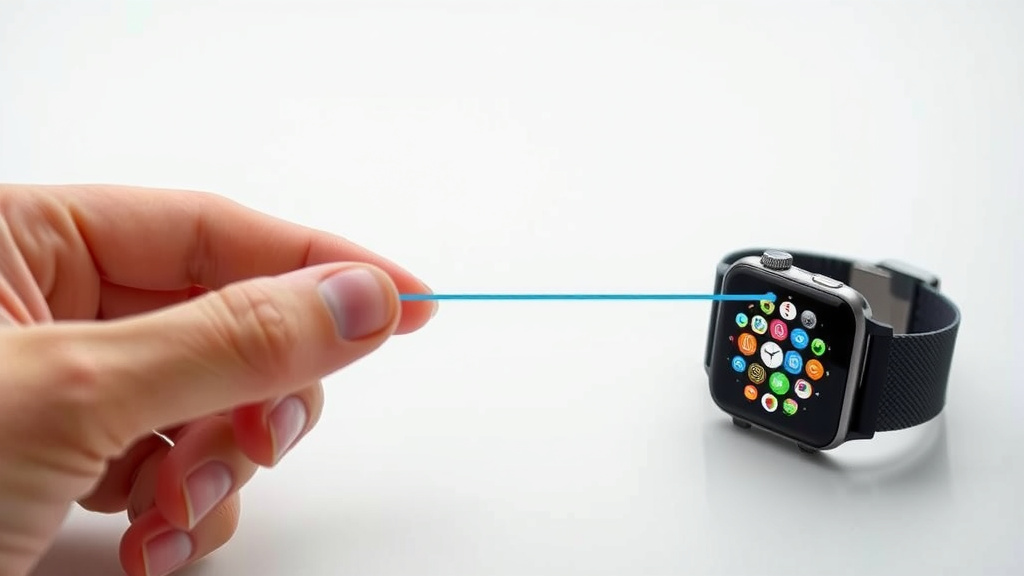
Smartwatch screens, like most rectangular displays, are measured diagonally. This means you’ll be measuring from one corner of the viewable screen to the opposite corner. Think of it like drawing a line across the screen from the top-left to the bottom-right, or top-right to the bottom-left.
Step-by-Step Measurement Guide
Let’s get down to it. Follow these simple steps to get your measurement.
- Place your smartwatch on a flat, stable surface.
- Carefully position the start of your ruler or tape measure at one corner of the actual display. It’s important not to include the watch’s frame or bezel.
- Stretch the ruler or tape measure diagonally across the screen to the opposite corner.
- Read the measurement where the ruler or tape ends. Note the number.
Focusing on the Viewable Area
It’s really important to measure only the screen itself. The bezel is the outer rim of the watch. This part isn’t part of the display. Manufacturers usually list the screen size for the viewable area. So, when you measure, make sure your ruler only touches the glass that lights up.
We found that some people accidentally include part of the bezel. This can lead to a slightly larger number. Just focus on the part where apps and watch faces appear. That’s the true screen size. This measurement is typically given in inches.
Understanding the Measurement Units
The standard unit for smartwatch screen sizes is inches. You’ll see numbers like 1.4 inches, 1.7 inches, or even 1.9 inches. This is a linear measurement. It’s not about the screen’s area, just its longest dimension diagonally. So, a 1.5-inch screen is 1.5 inches from corner to corner.
Why Screen Size Matters for Your Experience
Knowing your smartwatch’s screen size isn’t just a technical detail. It genuinely affects how you use the device every day. A larger screen might show more information at once. A smaller screen can feel more discreet and comfortable for some people.
Impact on App Usability
Think about how you interact with your watch. Do you check notifications frequently? Do you use a lot of apps? A larger display can make text easier to read and buttons easier to tap. We found that users with larger screens often report easier navigation. Smaller screens can sometimes feel a bit cramped for complex apps.
Aesthetic and Comfort Considerations
The screen size also plays a big role in the overall look of the watch. A large screen on a small wrist might feel overwhelming. Conversely, a tiny screen on a larger watch might look a bit lost. Comfort is key with any wearable. We found that many people choose a watch where the screen size feels balanced with the watch case size and their wrist.
Common Smartwatch Screen Sizes You Might See
Different smartwatches come with a variety of screen dimensions. Manufacturers offer choices to suit different preferences. Here’s a general idea of what you might encounter.
| Smartwatch Category | Typical Diagonal Screen Size (Inches) |
|---|---|
| Compact / Smaller Smartwatches | 1.2 – 1.4 inches |
| Standard / Mid-Size Smartwatches | 1.4 – 1.7 inches |
| Larger / Feature-Rich Smartwatches | 1.7 – 1.9+ inches |
Keep in mind that these are just general ranges. The actual size can vary widely. Many factors influence the final design, like the watch’s battery size and overall shape. For example, a round screen might have a different effective usable area compared to a square one, even with the same diagonal measurement.
Quick Checklist for Measuring Your Smartwatch Screen
Here’s a handy checklist to make sure you’ve got your measurement right:
- Tool Ready: Have your ruler or tape measure handy.
- Flat Surface: Ensure your watch is on a stable, level spot.
- Corners First: Start at one corner of the *viewable* screen.
- Diagonal Path: Measure straight across to the opposite corner.
- Display Only: Do NOT include the bezel or frame.
- Note the Inches: Record the measurement in inches.
Conclusion
You’ve learned that measuring your smartwatch screen is a simple, hands-on task. Remember to focus on the diagonal measurement of the viewable display area, not including the bezel. This quick step ensures you know exactly what you’re working with, whether you’re comparing specs for a new purchase or just curious about your current device. Understanding this dimension helps you appreciate how much information fits on your wrist and how the watch balances aesthetics with comfort.
Now that you know how to get the exact measurement, take a moment to measure your watch. It’s a small detail that can make a big difference in your user experience!
Frequently Asked Questions
Do I need special tools to measure my smartwatch screen?
No, you don’t need any special tools. A standard ruler or a flexible measuring tape is all you’ll need to get an accurate measurement of your smartwatch screen. Most people have these items readily available at home.
Can I just measure the width or height of the screen?
Smartwatch screen sizes are always measured diagonally. Measuring just the width or height won’t give you the standard dimension that manufacturers use. Always go from one corner to the opposite corner for the correct measurement.
What if my ruler doesn’t reach the full diagonal length?
If your ruler is too short, you can still get the measurement accurately. Simply place the zero mark at one corner, mark where the ruler ends, and then move the ruler to start at that mark and continue to the opposite corner. Add the measurements together for the total diagonal length.
Is the screen size measurement the same as the watch’s physical size?
No, the screen size measurement is different from the overall physical size of the watch. The screen size refers only to the display area. The physical size includes the casing, bezel, and any other components around the screen.
Will measuring the screen size affect my warranty?
Measuring your smartwatch screen will not affect your warranty in any way. You are simply taking a physical measurement of the display. This is a common practice for understanding device specifications and does not involve altering the device itself.
![7 Best Smart Watch For Iphone With Long Battery Life [2026]](https://smartwatchbest.com/wp-content/uploads/2026/09/7-best-smart-watch-for-iphone-with-long-battery-life-2026-featured-768x432.jpg)