How to Change Your Smartwatch Band in Minutes
Changing your smartwatch band is surprisingly **easy and quick**. Most smartwatches use a **simple release mechanism** that lets you swap bands in seconds without any special tools. You can easily update your watch’s look to match your outfit or mood.
Swapping out your band can **revitalize your smartwatch’s appearance**. It’s a fantastic way to **personalize your device** and make it feel brand new. Plus, different materials offer varying levels of comfort and durability for various activities.
- Most bands attach with a simple quick-release pin.
- You don’t usually need special tools to swap bands.
- Check your watch model for specific instructions.
- You can easily change your band to suit any occasion.
Let’s walk through exactly how to change your smartwatch band, step by step, so you can start customizing in no time!
Swapping Your Smartwatch Band: A Simple Guide
Changing your smartwatch band is easier than you might think! It’s a great way to **refresh your watch’s look** without buying a whole new device. Most modern smartwatches use a clever system that lets you swap bands in a **matter of seconds**. You don’t need to be a tech wizard or have a toolbox.
Understanding Your Watch’s Band Mechanism
The vast majority of smartwatches on the market today use what’s called a **quick-release pin**. These pins have a tiny lever or spring-loaded bar that makes removal and attachment simple. It’s designed for user-friendliness, so you can change your band at home. You’ll find this mechanism on popular brands like Apple Watch, Samsung Galaxy Watch, Fitbit, Garmin, and many others.
What is a Quick-Release Pin?
Imagine a small metal rod that holds your watch band in place. A quick-release pin has a small lever built right into the rod. When you slide this lever, it retracts the spring-loaded ends of the pin. This allows the band to slide out of the lug holes on your watch case. Pushing the lever back allows the pin to extend again, securing the new band.
Are There Other Types of Bands?
While quick-release pins are the most common, some older or more specialized watches might use a traditional spring bar and require a small tool. A spring bar is similar to a quick-release pin but lacks the lever. You’d typically need a small, fork-shaped tool called a “spring bar tool” to depress the ends and remove it. However, for most users today, the quick-release system is what you’ll encounter. We’ll focus on that here.
Gathering What You’ll Need (Probably Nothing!)
The beauty of the quick-release system is that it’s usually **tool-free**. You really only need your hands and your new smartwatch band. Sometimes, a very stubborn quick-release lever might benefit from a fingernail or even a plastic card. However, avoid using anything sharp or metal that could scratch your watch.
Your New Smartwatch Band
Make sure the band you purchased is **compatible with your specific smartwatch model**. Bands are usually measured by width (e.g., 20mm, 22mm) and sometimes by the lug design of the watch. Check the product description or your watch manual to be sure. A band that’s the wrong size simply won’t fit, no matter how hard you try!
The Step-by-Step Process for Changing Your Band
Let’s get down to business! This is where you’ll see just how simple it is. Follow these steps, and you’ll be a pro in no time.
Step 1: Position Your Watch
Lay your smartwatch face down on a soft, clean surface. A microfiber cloth or a towel works perfectly. This prevents scratches on your watch screen. Make sure the back of the watch is easily accessible.
Step 2: Locate the Quick-Release Lever
Look at the underside of the watch where the band connects to the watch case. You’ll see the pin holding the band. On that pin, you should spot a small lever or nub. This is the part you’ll manipulate.
Step 3: Depress the Lever and Remove the Old Band
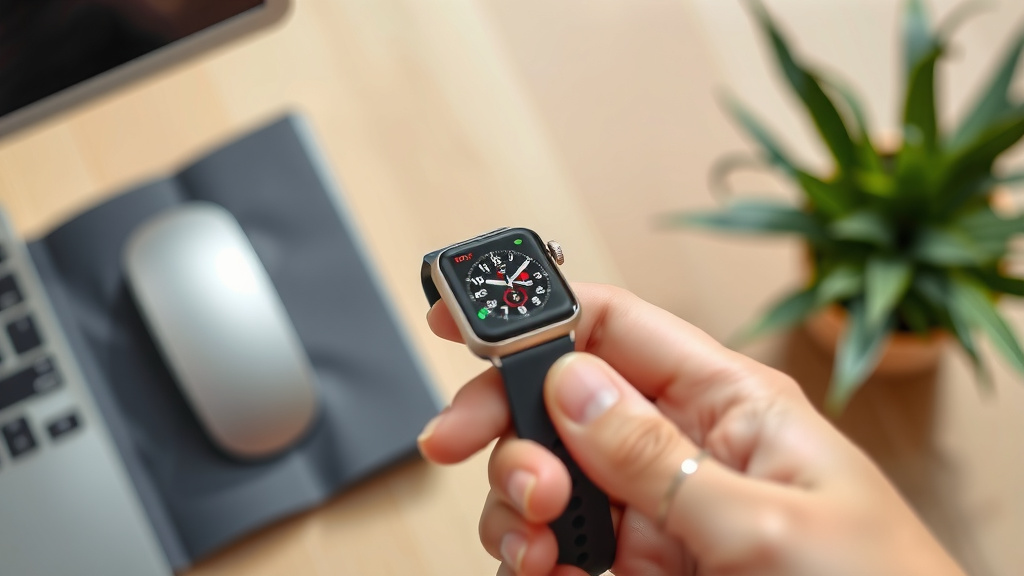
Gently slide the quick-release lever towards the watch band. As you slide it, you’re retracting the pin. While holding the lever, gently pull the old band away from the watch case. The pin should slide out of the lug hole easily. Once one side is out, you can usually lift the band away.
Step 4: Align and Insert the New Band
Take your new smartwatch band. Position one end of the new band between the watch lugs, just like the old one was. Make sure the quick-release pin is aligned with the lug hole on the watch case.
Step 5: Secure the New Band
Slide the quick-release lever again, retracting the pin. Gently push the pin into the lug hole. Once the pin is fully seated in the hole, release the lever. The pin will extend, securing the band. You should hear a faint click or feel it snap into place. It’s a good idea to give the band a gentle tug to ensure it’s securely attached.
Step 6: Repeat for the Other Side
Now, simply repeat steps 3 through 5 for the other side of the watch band. Ensure both sides are securely attached before wearing your watch.
Troubleshooting Common Issues
Most of the time, this process is straightforward. But what if you run into a snag? Don’t worry, it’s usually a minor fix.
Stiff or Stubborn Levers
Sometimes, the quick-release lever can be a bit stiff, especially on a new band or if it hasn’t been swapped in a while. Try using a fingernail to get a better grip on the lever. If that doesn’t work, a plastic card (like a credit card or gift card) can sometimes provide enough leverage without damaging the watch. We found that a firm, steady pressure usually does the trick (Fitbit Community Forums).
Band Not Clicking into Place
If the band doesn’t feel secure, or if you don’t hear a click, the pin might not be fully extended. Ensure the lever is fully released and the pin is seated properly in both lug holes. Sometimes, a tiny piece of debris can obstruct the hole. Gently inspect the lug holes and the pin ends.
Incorrect Band Size or Type
This is the most common reason for difficulty. If the band looks too wide or too narrow, or the pin doesn’t seem to line up, you likely have an incompatible band. Double-check the specifications for your watch model and the band you purchased. Many sources recommend looking for bands explicitly listed as compatible with your watch series.
Tips for Maintaining Your Smartwatch Bands
Once you’ve mastered the swap, you’ll want to keep your bands in great shape.
- Clean regularly: Wipe down your bands with a damp cloth. For silicone bands, mild soap and water work well. For leather, use a specialized leather cleaner.
- Dry thoroughly: Especially after sweating or getting them wet, ensure bands are completely dry before reattaching them or storing them.
- Inspect pins: Periodically check that the quick-release pins are functioning correctly and aren’t bent or damaged.
- Store properly: Keep extra bands in a cool, dry place away from direct sunlight, which can degrade materials over time.
When to Seek Professional Help
In the rare case that your watch has a unique band-attachment system, or if you encounter a damaged lug or pin that you can’t fix, it might be time to visit a **professional jeweler or a smartwatch repair shop**. They have specialized tools and expertise for more complex situations. For most standard smartwatches, however, you should be able to handle band changes yourself.
Conclusion
You’ve learned that changing your smartwatch band is a straightforward process. The common quick-release pin system means you likely won’t need any special tools. It’s a fantastic way to personalize your device, match your style, or switch to a more functional band for workouts. You can refresh your watch’s look in minutes. Now, go ahead and pick out that new band you’ve been eyeing. Your smartwatch is ready for a fresh new look!
Frequently Asked Questions
How do I know if a new band will fit my smartwatch?
You need to check the band’s width and ensure it’s compatible with your specific smartwatch model. Most bands list their width in millimeters (e.g., 20mm, 22mm) and often specify which watch models they fit. Always compare this information with your watch’s specifications before purchasing.
What if the quick-release lever is stuck or hard to move?
If the lever is stiff, try using your fingernail for better grip. Sometimes a plastic card can provide extra leverage without scratching your watch. Apply firm, steady pressure. Avoid using metal tools as they can easily damage the pin or your watch case.
Can I use any watch band on my smartwatch?
Not necessarily. While many smartwatches use standard band widths and quick-release pins, some brands or models might have proprietary lug designs or attachment mechanisms. Always verify compatibility with your watch model before buying a new band.
How often should I change my smartwatch band?
You can change your band as often as you like! Many people swap bands to match different outfits, occasions, or activities. There’s no set schedule; change it when you feel like a refresh or need a different band material for comfort or durability.
What should I do if the new band feels loose after installation?
If your band feels loose, double-check that the quick-release pin is fully extended and seated correctly in both lug holes. Ensure you heard a click or felt it snap into place. If it’s still loose, the band might be slightly incompatible or the pin could be damaged, and you may need to re-check its fit.

![7 Best Smart Watch For Hrv [2026]](https://smartwatchbest.com/wp-content/uploads/2026/09/7-best-smart-watch-for-hrv-2026-featured-768x432.jpg)
![7 Best Smart Watch For Older Adults [2026]](https://smartwatchbest.com/wp-content/uploads/2026/07/7-best-smart-watch-for-older-adults-2026-featured-768x432.jpg)
![7 Best Smart Watch For Health Metrics [2026]](https://smartwatchbest.com/wp-content/uploads/2026/09/7-best-smart-watch-for-health-metrics-2026-featured-768x432.jpg)