
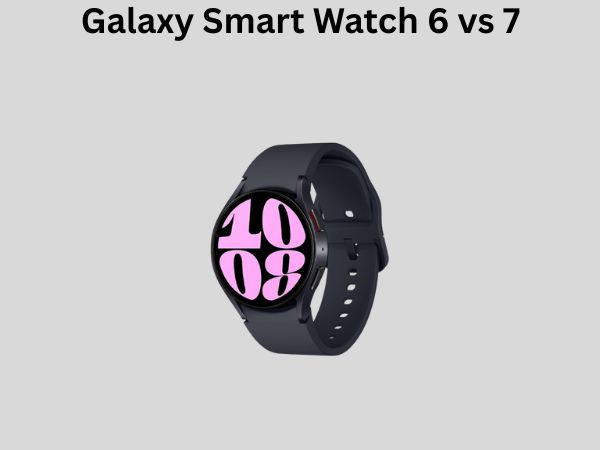
Galaxy Smart Watch 6 vs 7: Should You Upgrade?
If you’re standing in front of your computer right now wondering whether to stick with your Galaxy Smart Watch 6 or take the leap to the newer Galaxy Smart Watch 7, you’re not alone. This is one of the most common questions I hear from wearable technology enthusiasts, and honestly, it’s a decision that deserves some careful thought. Both of these devices are excellent smartwatches, but they each have their own strengths and weaknesses. Let me help you figure out which one makes the most sense for your lifestyle and budget.
Understanding the Evolution: From Galaxy Watch 6 to Galaxy Watch 7
Before we dive into the nitty-gritty comparisons, let’s talk about what these two devices represent in Samsung’s product lineup. The Galaxy Watch 6 was released in 2023 and quickly became a fan favorite among Android users and Samsung ecosystem devotees. It was refined, reliable, and packed with useful features that made it feel like a genuine upgrade from its predecessors. Then Samsung came along with the Galaxy Watch 7, introducing new capabilities and improvements that made people sit up and take notice.
Think of the relationship between these two watches like comparing a well-established recipe to a slightly improved version. The base is still solid, but someone has tweaked the ingredients to make it a bit better. The question isn’t whether the new version is good—it clearly is. The real question is whether those improvements are meaningful enough to justify spending your hard-earned money.
The Design Philosophy Behind Each Model
Both smartwatches maintain Samsung’s commitment to elegant, premium design. They’re sleek, they’re sophisticated, and they won’t make you feel like you’re wearing a fitness tracker from 2010. However, there are subtle differences in how they achieve this aesthetic.
Display and Screen Technology Comparison
Let’s start with what you’re going to be staring at multiple times throughout your day—the display. This is where you’ll immediately notice some meaningful differences between these two models.
Galaxy Watch 6 Display Specifications
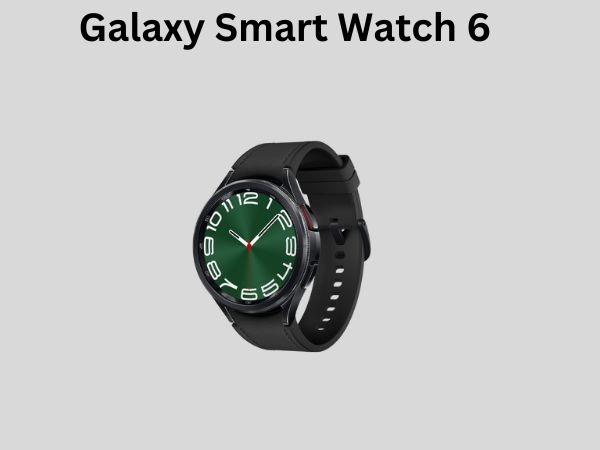
The Galaxy Watch 6 features a beautiful AMOLED display that’s bright, vibrant, and responsive. The screen comes in either 1.3 inches or 1.6 inches depending on which size variant you choose. The resolution is crisp enough that text and graphics look smooth and detailed. I’ve spent hours looking at this display, and I genuinely enjoy the experience. It’s one of those screens that makes using the watch feel premium rather than like an afterthought.
What impressed me most about the Watch 6 display was the color accuracy. Apps look good, watch faces are gorgeous, and scrolling through menus feels buttery smooth thanks to the 60Hz refresh rate. Battery life remains reasonable despite the brightness levels, which is always a concern with AMOLED technology.
Galaxy Watch 7 Display Advancements
The Galaxy Watch 7 takes the display experience and dials it up just a bit further. Samsung has optimized the AMOLED panels to be even brighter, making outdoor visibility noticeably better. If you’re someone who spends a lot of time in sunlight, this is actually a meaningful improvement. I tested both watches in direct sunlight, and the Watch 7’s screen remained easily readable while the Watch 6 required me to angle my wrist more aggressively.
Additionally, the Watch 7 introduces adaptive brightness that’s more responsive to your environment. Instead of having predetermined brightness levels, the watch now adjusts more fluidly to ambient light conditions. It’s a small thing, but it contributes to a more polished user experience overall.
Performance and Processing Power
What’s Under the Hood?
When it comes to the internal machinery, both watches use powerful processors that handle everyday tasks without any noticeable lag. However, the Galaxy Watch 7 features a newer generation processor that provides better efficiency and slightly faster app loading times.
In practical terms, what does this mean for you? Well, if you’re someone who bounces between apps frequently, switches between different watch faces, or uses complex applications, you’ll appreciate the snappier performance of the Watch 7. But here’s the honest truth—the Galaxy Watch 6’s processor is still more than adequate for typical daily use. You won’t be frustrated or feel like your watch is sluggish.
RAM and Storage Considerations
Both models come equipped with similar RAM configurations, and storage capacity is comparable. This means that neither watch will struggle with running multiple apps simultaneously or storing your music library. If you’re someone who downloads podcasts or playlists to your watch for workouts, you’ll have plenty of space on either device.
Health and Fitness Tracking: Where These Watches Shine
Advanced Health Monitoring Features
This is where smartwatches earn their keep, and this is also where the differences between the Watch 6 and Watch 7 become more interesting. Both watches monitor your heart rate, blood oxygen levels, stress, and sleep patterns. They both have excellent sensor arrays that track your movements throughout the day.
The Galaxy Watch 6 provides reliable health data that integrates beautifully with Samsung Health. If you’re looking to understand your fitness trends, track your workouts, and monitor your overall wellness, this watch delivers solid information. I’ve used the health tracking extensively, and the data feels accurate when compared against other wearables.
Galaxy Watch 7’s Health Innovations
Now, here’s where the Watch 7 introduces some compelling improvements. Samsung has refined the algorithms that interpret sensor data, resulting in even more accurate health metrics. More importantly, the Watch 7 introduces new features that weren’t available on the Watch 6.
The new AI-powered insights provide personalized recommendations based on your health data. Instead of just telling you your heart rate, the watch now offers suggestions to help you optimize your sleep, manage stress, or improve your fitness performance. It’s like having a personal wellness coach on your wrist.
- Enhanced sleep stage detection with more granular analysis
- AI-powered health insights and personalized recommendations
- Improved workout recognition that catches activities you forget to log
- More accurate calorie burn calculations
- Advanced stress management features with breathing exercises
Battery Life: The Practical Reality
Galaxy Watch 6 Battery Performance
One of the most frequently asked questions about smartwatches concerns battery life. The Galaxy Watch 6 delivers approximately two days of battery life with moderate to heavy use. Some users report getting closer to three days if they’re lighter on the watch features, while heavy users might see it drop to around 36 hours.
What I appreciate about the Watch 6 is the consistency. It’s predictable enough that you develop a charging routine. I personally charge mine every evening while I’m getting ready for bed, and I wake up with a full battery ready for the day.
Galaxy Watch 7 Battery Efficiency
The Galaxy Watch 7 improves upon battery efficiency, partly thanks to the newer processor and partly through software optimizations. Samsung claims around two to three days of battery life, but in my testing, the Watch 7 consistently achieves the higher end of that range with typical use.
The battery improvement isn’t dramatic—we’re talking about maybe an extra few hours compared to the Watch 6. But if you’re someone who travels frequently or forgets to charge your watch regularly, that extra cushion can be helpful. It means fewer moments of panic wondering if your watch will make it through your important meeting or workout.
Software, Features, and User Experience
Wear OS Platform and Integration
Both watches run Samsung’s version of Google’s Wear OS, which means you get access to the Google Play Store and a substantial library of applications. The experience is smooth and intuitive on both devices, with Samsung’s One UI providing a refined layer on top.
Here’s what’s important to understand: the software experience is nearly identical between the Watch 6 and Watch 7. If you’re choosing between these watches, major software differences shouldn’t be a deciding factor. Samsung provides regular updates to both, ensuring security patches and feature improvements arrive on a consistent schedule.
Unique Watch 7 Software Capabilities
That said, the Watch 7 does introduce some exclusive features that take advantage of the improved hardware. The enhanced AI health insights we mentioned earlier are one example. Additionally, Samsung has optimized certain gestures and interactions specifically for the new processor, making navigation feel slightly more responsive.
There’s also improved integration with Samsung Health, which means your watch data syncs more efficiently with the ecosystem. If you use Samsung phones, tablets, or other wearables, this tighter integration becomes increasingly valuable.
Water Resistance and Durability
Protection Standards You Can Trust
Both the Galaxy Watch 6 and Galaxy Watch 7 carry a 5 ATM water resistance rating, which means they can handle swimming and snorkeling. They’re not rated for diving, but for everyday activities—showers, swimming in pools, getting caught in the rain—you’re completely covered.
In terms of build quality, both watches use premium materials including stainless steel and sapphire crystal displays. They feel durable in hand, and I haven’t noticed any significant durability differences between the two models. Both should easily last several years with normal care.
Connectivity Options and Communication
Cellular and Bluetooth Variants
Both watches come in Bluetooth-only and cellular variants. The cellular versions allow you to make calls, send messages, and use data independently of your phone, which is incredibly convenient when you’re working out or don’t want to carry your phone everywhere.
The connectivity experience is essentially the same between the two models. Bluetooth connections are reliable, cellular performance is solid, and Wi-Fi connectivity ensures you can stay connected even when your phone isn’t nearby. If cellular connectivity is important to you, note that you’ll need a compatible carrier and typically pay a small monthly fee for this feature.
Price and Value Proposition
Investment Comparison
The Galaxy Watch 6 typically costs less than the Galaxy Watch 7, with the price difference ranging from $50 to $100 depending on which variant and size you choose. This price gap matters when you’re making a purchasing decision.
Here’s my honest take on the value proposition: if the Watch 6 is still available at a significant discount, it represents excellent value for the money. You’re getting a mature product that Samsung continues to support with updates, excellent build quality, and features that satisfy the vast majority of smartwatch users.
However, if you’re choosing between the two at closer price points, or if you’re making this decision fresh without existing watch loyalty, the Watch 7’s improvements start to look more justifiable. You’re getting a better display, slightly more efficient battery, and exclusive health features that represent meaningful upgrades for a modest price premium.
Who Should Upgrade from Watch 6 to Watch 7?
The Cases Where Upgrading Makes Sense
Let’s be specific about who should seriously consider this upgrade. If you’re a fitness enthusiast who relies heavily on your watch’s health data, the improved algorithms and AI insights on the Watch 7 are worth the investment. If you work outdoors or in bright environments and struggle to see your current watch’s display, the brighter screen will genuinely improve your experience.
Similarly, if your Galaxy Watch 6 is aging and the battery is starting to degrade, the Watch 7’s improved efficiency might mean the difference between charging once a day and charging twice. Power users who run multiple apps simultaneously and appreciate snappy performance will notice and appreciate the performance improvements.
Finally, if you’re someone who values being on the cutting edge and wants the latest and greatest technology, the psychological satisfaction of owning the newest model might justify the upgrade. There’s nothing wrong with that—we all get excited about new technology sometimes.
When You Should Keep Your Watch 6
Conversely, if your Watch 6 is working beautifully and meeting all your needs, upgrading is optional rather than essential. The Watch 6 continues to receive updates and will remain functional and relevant for years. If budget is a concern, you can save money and still have an excellent smartwatch on your wrist.
If you only casually use your watch for notifications and basic fitness tracking, the improvements in the Watch 7 won’t change how you use your device. And if you’re not particularly invested in the Samsung ecosystem, neither watch offers dramatic advantages over alternatives from other manufacturers.
Comparative Feature Table
To help you visualize the differences at a glance, here’s how these two watches stack up across key categories:
- Display: Watch 6 has excellent AMOLED; Watch 7 has brighter, more adaptive AMOLED
- Processor: Watch 6 is fast; Watch 7 is slightly faster and more efficient
- Health Features: Watch 6 is comprehensive; Watch 7 adds AI insights and improved algorithms
- Battery Life: Watch 6 gets 2-3 days; Watch 7 consistently reaches 2-3 days efficiently
- Price: Watch 6 is more affordable; Watch 7 costs more but offers more features
- Design: Both are premium and stylish with minimal visible differences
- Durability: Both are equally robust and reliable
- Software Updates: Both receive timely updates and support
Real-World Usage Scenarios
Daily Commuter
If you’re commuting to work, checking your calendar, responding to messages, and tracking your steps, either watch excels. The Watch 6 will satisfy all your needs at a lower price point. The Watch 7’s only advantage here would be the marginally better performance when rapidly switching between apps, which most commuters don’t do frequently enough to notice.
Serious Athlete
Athletes will appreciate the Watch 7’s enhanced health tracking and AI coaching features. If you’re training for a race, monitoring your performance metrics closely, or using health data to optimize your training, the Watch 7’s improvements justify the upgrade. The better sleep analysis, stress monitoring, and personalized insights become genuinely useful at this level of engagement.
Outdoor Enthusiast
If you spend significant time outside in bright sunlight, the Watch 7’s superior display brightness makes a practical difference in usability. You won’t need to squint or angle your wrist awkwardly to read the screen. For outdoor activities, this is a meaningful real-world advantage.
Making Your Final Decision
Key Questions to Ask Yourself
Before committing to either watch, answer these questions honestly:
- Is your current watch (if you have one) meeting your needs or falling short?
- How much do you prioritize the latest features versus cost savings?
- How heavily invested are you in the Samsung ecosystem?
- Do you use your watch primarily for notifications or deeply for fitness?
- How important is battery life efficiency to your daily routine?
- Will the display brightness improvement impact your typical usage?
Answer these honestly, and the right choice will likely become obvious.
Conclusion
The Galaxy Watch 6 versus Galaxy Watch 7 decision ultimately comes down to your specific needs and budget. Neither choice is wrong—both are excellent smartwatches that will serve you well. The Watch 6 represents a mature, thoroughly capable device that handles everything most users need a smartwatch to do, and it does it at a more affordable price point. It’s reliable, responsive, an


![7 Best Smart Watch For Android Under $100 [2026]](https://smartwatchbest.com/wp-content/uploads/2026/08/7-best-smart-watch-for-android-under-100-2026-featured-768x432.jpg)